MCP Server Authentication in .NET: Implement OAuth 2.1 with PKCE Natively

TL;DR: The Model Context Protocol (MCP) specification mandates using OAuth 2.1 with PKCE for server authentication.
This article walks through implementing this authentication layer natively in ASP.NET Core, including authorization server, dynamic client registration, PKCE verification, and token issuance.
MCP Server Authentication
The Model Context Protocol (MCP) allows building MCP servers that expose your backend as a set of tools to MCP clients.
The MCP specification addresses how the authorization layer should be implemented. Remote MCP servers must use OAuth 2.1 to protect their endpoints.
For large scale systems, the strategy is usually using a managed Identity Provider (IdP) like Asgardeo. It handles the authorization server, dynamic client registration, token management, and refresh token handling OOTB. You can configure your application as a resource server, point the WWW-Authenticate header at Asgardeo’s discovery endpoint, and you’re done.
But not every project will need that overhead. For a smaller app where adding a SaaS/On-Prem IdP is hard, you can implement the OAuth 2.1 layer yourself. The specification is clear enough that a well-scoped native implementation is straightforward.
This article walks through building the authentication for an MCP server in ASP.NET Core natively.
Here is the complete flow we’ll implement:
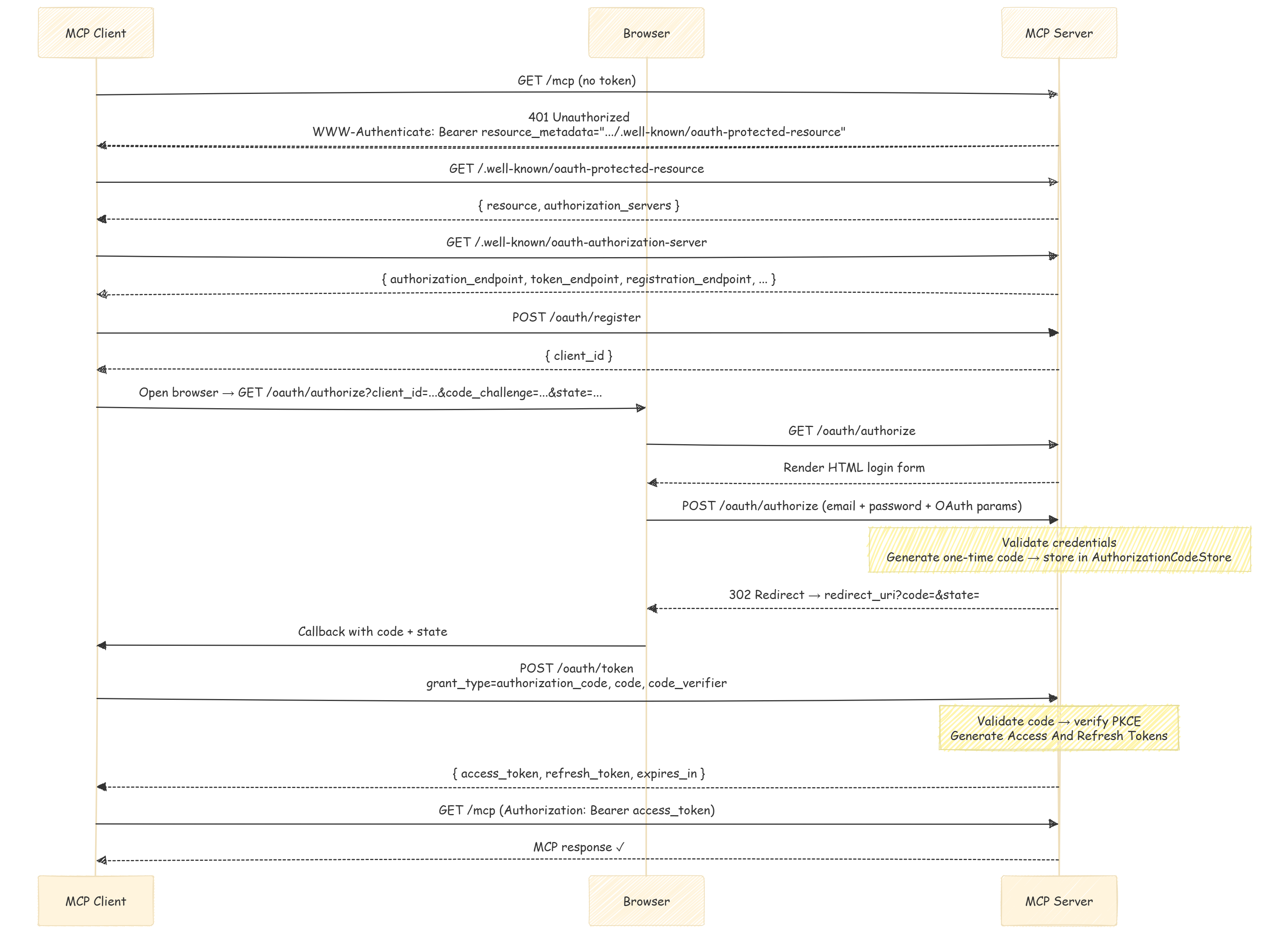
Overview of the Requirements
- OAuth 2.1 — Authorization code flow needs to be used.
- PKCE — Proof Key for Code Exchange (S256 method only). Prevents authorization code interception attacks.
- Dynamic Client Registration — MCP clients need to auto-register before starting the auth flow. MCP server must accept
POST /oauth/registerand return aclient_id. - Discovery endpoints — two well-known URLs that allow clients to find your authorization and token endpoints:
GET /.well-known/oauth-protected-resourceGET /.well-known/oauth-authorization-server
- A
WWW-Authenticateheader — when a request arrives at the MCP endpoint without a valid token, the MCP server must respond with401status code and a header that points to the protected resource metadata URL.
Once a client has a valid Bearer token, every subsequent request to /mcp must carry it in the Authorization header. Your API validates it the same way it validates any JWT.
Initial Setup
The MCP SDK for .NET (ModelContextProtocol.AspNetCore) handles the protocol transport. Here, the authentication is handled using the standard ASP.NET Core JWT Bearer middleware.
// Program.cs
builder.Services.AddMcpServer()
    .WithHttpTransport(o => o.Stateless = true)
    .WithToolsFromAssembly();

builder.Services.Configure<OAuthOptions>(
    builder.Configuration.GetSection(OAuthOptions.Section));
builder.Services.AddSingleton<AuthorizationCodeStore>();
WithToolsFromAssembly() discovers all classes decorated with [McpServerToolType] and registers their methods automatically as MCP tools. Stateless = true tells the transport layer not to maintain session state between requests. Here, each call is self-contained, which is the norm for API endpoints.
app.MapMcp("/mcp").RequireAuthorization("McpAccess");
Here our /mcp endpoint uses a named policy rather than bare .RequireAuthorization(). Without this, any valid JWT issued by this server (including unrelated app sessions) could call the MCP tools. The policy to restrict access is defined in the authorization setup:
services.AddAuthorization(options =>
{
    options.AddPolicy("McpAccess", policy =>
        policy.RequireAuthenticatedUser()
              .RequireClaim("scope", "mcp:tools"));
});
RequireClaim("scope", "mcp:tools") ensures only tokens issued through the MCP OAuth flow pass. Tokens from normal login flows do not carry this claim, and they’re rejected at the MCP endpoint even if they’re otherwise valid.
401 Challenge and Exposing well-known URLs
When a client hits /mcp without a token, in addition to the default JWT Bearer 401 response, the MCP spec requires the WWW-Authenticate response header to include a resource_metadata URL. MCP clients use this URL to discover the authorization server and start the OAuth flow.
We use the JWT Bearer OnChallenge event to add it:
builder.Services.PostConfigure<JwtBearerOptions>(
    JwtBearerDefaults.AuthenticationScheme, options =>
{
    options.Events ??= new JwtBearerEvents();
    options.Events.OnChallenge = async context =>
    {
        if (!context.HttpContext.Request.Path.StartsWithSegments("/mcp"))
        {
            // Let the default challenge handler run for non-MCP endpoints.
            return;
        }

        context.HandleResponse();
        context.Response.StatusCode = StatusCodes.Status401Unauthorized;

        var issuer = $"{context.Request.Scheme}://{context.Request.Host}";
        var resourceMetadata = $"{issuer}/.well-known/oauth-protected-resource";

        context.Response.Headers["WWW-Authenticate"] =
            $"Bearer realm=\"mcp\", resource_metadata=\"{resourceMetadata}\"";
    };
});
context.HandleResponse() will suppress the default 401 body and let you write your own. The resource_metadata value is the URL that the client will fetch next.
Exposing Discovery Endpoints
The client follows the resource_metadata URL to learn about our authorization server. Two endpoints are required:
[ApiController]
[AllowAnonymous]
[Route(".well-known")]
public class WellKnownController : ControllerBase
{
    [HttpGet("oauth-protected-resource")]
    public IActionResult GetProtectedResourceMetadata()
    {
        var issuer = GetIssuer();
        return Ok(new Dictionary<string, object>
        {
            ["resource"] = $"{issuer}/mcp",
            ["authorization_servers"] = new[] { issuer },
            ["scopes_supported"] = new[] { "mcp:tools" }
        });
    }

    [HttpGet("oauth-authorization-server")]
    public IActionResult GetAuthorizationServerMetadata()
    {
        var issuer = GetIssuer();
        return Ok(new Dictionary<string, object>
        {
            ["issuer"] = issuer,
            ["authorization_endpoint"] = $"{issuer}/oauth/authorize",
            ["token_endpoint"] = $"{issuer}/oauth/token",
            ["registration_endpoint"] = $"{issuer}/oauth/register",
            ["response_types_supported"] = new[] { "code" },
            ["grant_types_supported"] = new[] { "authorization_code", "refresh_token" },
            ["token_endpoint_auth_methods_supported"] = new[] { "none" },
            ["code_challenge_methods_supported"] = new[] { "S256" }
        });
    }

    private string GetIssuer() =>
        $"{Request.Scheme}://{Request.Host}{Request.PathBase}".TrimEnd('/');
}
This authorization_servers array in the protected resource response says to the client which authorization server endpoints it should use for authentication.
Dynamic Client Registration (DCR)
Since MCP clients don’t have pre-configured client_id values, they need to register themselves as clients the first time they connect. The POST /oauth/register endpoint accepts the request and returns a new client_id that they can use.
[HttpPost("register")]
public async Task<IActionResult> Register()
{
    string[]? redirectUris = null;

    if (Request.ContentType?.Contains("application/json") == true)
    {
        using var doc = await JsonDocument.ParseAsync(Request.Body);
        if (doc.RootElement.TryGetProperty("redirect_uris", out var urisEl)
            && urisEl.ValueKind == JsonValueKind.Array)
        {
            redirectUris = urisEl.EnumerateArray()
                .Select(u => u.GetString() ?? string.Empty)
                .Where(u => !string.IsNullOrEmpty(u))
                .ToArray();
        }
    }

    var clientId = _authorizationCodeStore.RegisterClient();

    return Ok(new Dictionary<string, object>
    {
        ["client_id"] = clientId,
        ["client_id_issued_at"] = DateTimeOffset.UtcNow.ToUnixTimeSeconds(),
        ["token_endpoint_auth_method"] = "none",
        ["grant_types"] = new[] { "authorization_code", "refresh_token" },
        ["response_types"] = new[] { "code" },
        ["redirect_uris"] = redirectUris ?? Array.Empty<string>()
    });
}
The client_id is a random Base64Url string that identifies a client using the authorization server. Note that we keep this in memory and don’t persist it anywhere.
Authorization Code Flow (with PKCE)
Authorization code flow with PKCE is required to be used by the MCP specification. This flow will have three steps.
- Render the login form
- Handle the credential submission and issue an authorization code
- Exchange the code for tokens
Step 1 — Render the Login Form
[HttpGet("authorize")]
public IActionResult Authorize(
    [FromQuery(Name = "client_id")] string clientId,
    [FromQuery(Name = "redirect_uri")] string redirectUri,
    [FromQuery(Name = "response_type")] string responseType,
    [FromQuery(Name = "code_challenge")] string codeChallenge,
    [FromQuery(Name = "code_challenge_method")] string codeChallengeMethod,
    [FromQuery] string state,
    [FromQuery] string? scope)
{
    var request = new OAuthAuthorizeRequest(
        clientId, redirectUri, responseType,
        codeChallenge, codeChallengeMethod, state, scope);

    if (!TryValidateAuthorizeRequest(request, out var validationError))
        return BadRequest(validationError);

    return RenderLoginForm(request);
}
Several validation checks:
- Valid
client_id(dynamically registered) response_type=codecode_challenge_method=S256- An allowed
redirect_uri
If any of the validations fail, the server must return a 400 error response with an appropriate error message.
Step 2 — Handle Credentials and Issue an Authorization Code
[HttpPost("authorize")]
public async Task<IActionResult> Authorize([FromForm] OAuthLoginForm form)
{
    var request = form.ToAuthorizeRequest();

    if (!TryValidateAuthorizeRequest(request, out var validationError))
        return BadRequest(validationError);

    var loginResult = await _authenticationService.Login(new LoginCommand
    {
        Email = form.Email,
        Password = form.Password,
        RememberMe = false
    });

    if (loginResult.IsError)
        return RenderLoginForm(request, GetLoginErrorMessage(loginResult));

    var user = await _userManager.FindByIdAsync(loginResult.Payload.UserId);

    var code = _authorizationCodeStore.Create(
        user.Id, request.ClientId, request.RedirectUri, request.CodeChallenge);

    var redirectUrl = BuildRedirectUrl(request.RedirectUri, code, request.State);
    return Redirect(redirectUrl);
}
Here, the _authenticationService can be any existing login service you have in your application. The key part is that on successful login, it generates a one-time authorization code and store it in memory along with the code_challenge. The state parameter is passed back to the client as is.
Step 3 — Exchange the Code for Tokens
private async Task<IActionResult> ExchangeAuthorizationCode(IFormCollection form)
{
    var code = form["code"].ToString();
    var clientId = form["client_id"].ToString();
    var redirectUri = form["redirect_uri"].ToString();
    var codeVerifier = form["code_verifier"].ToString();

    if (!_authorizationCodeStore.TryConsume(code, out var entry))
        return OAuthError("invalid_grant",
            "Authorization code is invalid or expired.", HttpStatusCode.BadRequest);

    if (entry.ClientId != clientId || entry.RedirectUri != redirectUri)
        return OAuthError("invalid_grant",
            "Authorization code does not match the request.", HttpStatusCode.BadRequest);

    if (!VerifyPkce(codeVerifier, entry.CodeChallenge))
        return OAuthError("invalid_grant",
            "PKCE verification failed.", HttpStatusCode.BadRequest);

    var user = await _userManager.FindByIdAsync(entry.UserId);
    var (accessToken, refreshToken) = await _authenticationService
        .GenerateAccessAndRefreshTokens(user, scope: "mcp:tools");

    return Ok(BuildTokenResponse(accessToken, refreshToken));
}
Again, your existing token generation logic can be reused here (Eg: Asp.NET Core Identity with JWT).
Here, TryConsume will remove the code from the store atomically, since authorization codes are single-use only. Then we run three checks in order:
- Verify the code belongs to the requesting client
- Verify the redirect URI matches
- Verify the PKCE verifier hashes to the stored challenge
private static bool VerifyPkce(string codeVerifier, string expectedChallenge)
{
    var challenge = WebEncoders.Base64UrlEncode(
        SHA256.HashData(Encoding.ASCII.GetBytes(codeVerifier)));

    return string.Equals(challenge, expectedChallenge, StringComparison.Ordinal);
}
PKCE makes this flow secure against interception attacks. Even if an attacker captures the authorization code, they cannot exchange it for tokens without the original code_verifier value, which only the legitimate client will have.
Authorization Code Store
As mentioned earlier, we use an in-memory store to handle code creation, consumption, and client registration. However, as per project requirements, this can be swapped out for a persistent store without much change to the overall logic.
If you need persistence across restarts, the store can be moved to a database table while the interface stays the same. Swap ConcurrentDictionary for EF Core tables, add an index on the code column, and a background cleanup job can be added for expired entries.
Code and client lifetimes can be set as needed:
public class AuthorizationCodeStore
{
    private static readonly TimeSpan CodeLifetime = TimeSpan.FromMinutes(2);
    private static readonly TimeSpan DynamicClientLifetime = TimeSpan.FromHours(24);

    private readonly ConcurrentDictionary<string, AuthorizationCodeEntry> _codes = new();
    private readonly ConcurrentDictionary<string, DateTimeOffset> _dynamicClients = new();

    public string Create(
        string userId, string clientId, string redirectUri, string codeChallenge)
    {
        PruneExpiredEntries();
        var code = GenerateCode();
        _codes[code] = new AuthorizationCodeEntry(
            userId, clientId, redirectUri, codeChallenge,
            DateTimeOffset.UtcNow.Add(CodeLifetime));
        return code;
    }

    public bool TryConsume(string code, out AuthorizationCodeEntry entry)
    {
        if (!_codes.TryRemove(code, out entry))
            return false;

        if (entry.ExpiresAtUtc <= DateTimeOffset.UtcNow)
        {
            entry = default!;
            return false;
        }

        return true;
    }

    public string RegisterClient()
    {
        PruneExpiredDynamicClients();
        var clientId = GenerateCode();
        _dynamicClients[clientId] = DateTimeOffset.UtcNow.Add(DynamicClientLifetime);
        return clientId;
    }

    public bool IsDynamicClient(string clientId) =>
        _dynamicClients.TryGetValue(clientId, out var expiry) && expiry > DateTimeOffset.UtcNow;

    private static string GenerateCode() =>
        WebEncoders.Base64UrlEncode(RandomNumberGenerator.GetBytes(32));

    private void PruneExpiredEntries()
    {
        var now = DateTimeOffset.UtcNow;
        foreach (var pair in _codes)
            if (pair.Value.ExpiresAtUtc <= now)
                _codes.TryRemove(pair.Key, out _);
    }

    private void PruneExpiredDynamicClients()
    {
        var now = DateTimeOffset.UtcNow;
        foreach (var pair in _dynamicClients)
            if (pair.Value <= now)
                _dynamicClients.TryRemove(pair.Key, out _);
    }
}
We use ConcurrentDictionary to make the store thread-safe without explicit locking. Also, TryRemove is atomic and it handles the race condition if two concurrent requests try to consume the same code.
Defining the MCP Tools
Now we have completed the authentication layer for the MCP server.
Defining the tools for your MCP is straightforward.
The SDK discovers them via [McpServerToolType] and [McpServerTool] added to your classes and methods.
For example:
[McpServerToolType]
public static class ProductTools
{
    [McpServerTool, Description("List products with optional search and pagination.")]
    public static async Task<ProductsResponse> GetProducts(
        IMediator mediator,
        [Description("Optional free-text search.")] string? searchText = null,
        [Description("Page number for pagination.")] int pageNumber = 1,
        [Description("Number of rows per page.")] int rowsPerPage = 50)
    {
        return await mediator.Send(new GetProductsQuery
        {
            SearchText = searchText,
            PageNumber = pageNumber,
            RowsPerPage = rowsPerPage
        });
    }
}
Dependencies like IMediator can be injected directly as method parameters, no constructor or controller needed. The SDK will resolve them from the DI container per request.
When to Use This approach vs. a Managed IdP
This implementation covers the MCP spec requirements and works well for a small to medium project with an existing user base and authentication system. It allows you to expose an MCP server without integrating a full Identity Provider, which can be overkill for simple use cases.
But in a larger system with multiple applications, shared user bases, or complex compliance requirements, a managed IdP can be the right choice. It already has the features you need, and it offloads the burden of securely implementing and maintaining the auth layer.
Check out Asgardeo or WSO2 Identity Server if you want to follow that route. Both support the MCP spec and can be configured with minimal effort.

Wrapping Up
Implementing MCP server authentication natively in ASP.NET Core with OAuth 2.1 and PKCE is not as complex as it looks once you break it into its components.
The spec is clear, and the existing .NET authentication features can integrate with the custom logic to handle the required flows.